


The more people are translating your project, the less time it takes to receive results, no one can doubt that. But there’s no guarantee that translations made by several people will be consistent in tone of voice, wording, and terminology usage. A glossary is one of the resources that should be added to help your translators understand the key terminology and how it should be translated.
In 2026, the glossary is more than just a guide for humans – it is also a major source of context for AI. Whether you’re working with linguists or using Crowdin AI, a glossary ensures that everyone (human translators or machines) speaks the same brand language.
Main benefits of a translation glossary for your localization project
Before starting a localization project, a great idea would be to add a Glossary that your translators would be able to use. Glossary usually includes a list of words and phrases that are:
- industry-specific
- commonly used across your product
- not to be translated
- abbreviations
- acronyms
Each glossary entry can include additional information such as approved translation, part of speech, and definition. Adding a Glossary to your project takes a few clicks, but the benefits are considerable.
Enhances translation quality and accuracy
A glossary helps translators make fewer mistakes by showing approved translations. In the age of AI translations, this is even more critical. By enabling glossaries in your AI Prompts, you provide “grounding” for Large Language Models (LLMs), preventing them from hallucinating or using generic synonyms for your specialized brand terms.
Learn more about how context improves translation quality.
Speeds up the translation process
The translation team works faster with a Glossary as they have more translation guidelines to follow. They’ll be able to copy the approved term translations or spend less time researching the meaning of the term to convey it properly, as they already have an explanation. Consistent translations leave less editing work for a translator to do. You will also be able to Pre-Translate more strings via translation memory, as more of them will share the same terminology.
Assists with maintaining a consistent brand voice
Whether, in the original English or localized versions, your product should sound and feel the same. This means that some of the product-specific terms should be used without changes across all the languages, and some other terms should be translated using colloquial or professional speech. Consistency also should be maintained across all the products, including the main pages, notifications, tooltip text, titles, and help documentation.
A glossary helps to achieve such consistency in the means of the terminology used, and as a result, the product provides a better user experience.
We'll show you how easy it is to make a glossary in Crowdin and use it in your localization projects
What should every translation glossary contain
When you make your translation glossary (which we’ll show you how to do soon! ), here are some terms you might want to include and explain:
- Terms that are specific to your brand: This could be your brand name, the names of your products, slogans, names of people, etc.
- Common industry language: These are words that translators may not know or be able to translate correctly without help. They are more common in complex fields like tech and medicine. Terminology management is especially important in industries like action sports, where brand credibility depends on the consistent use of technical product names and sport-specific terms across markets.
- Unique terms for your audience: Make sure to set the rules for the language they use and understand.
- Marketing words and phrases: Is your marketing based on certain words or phrases? Make sure that these aren’t changed in the translation so that your work doesn’t go to waste.
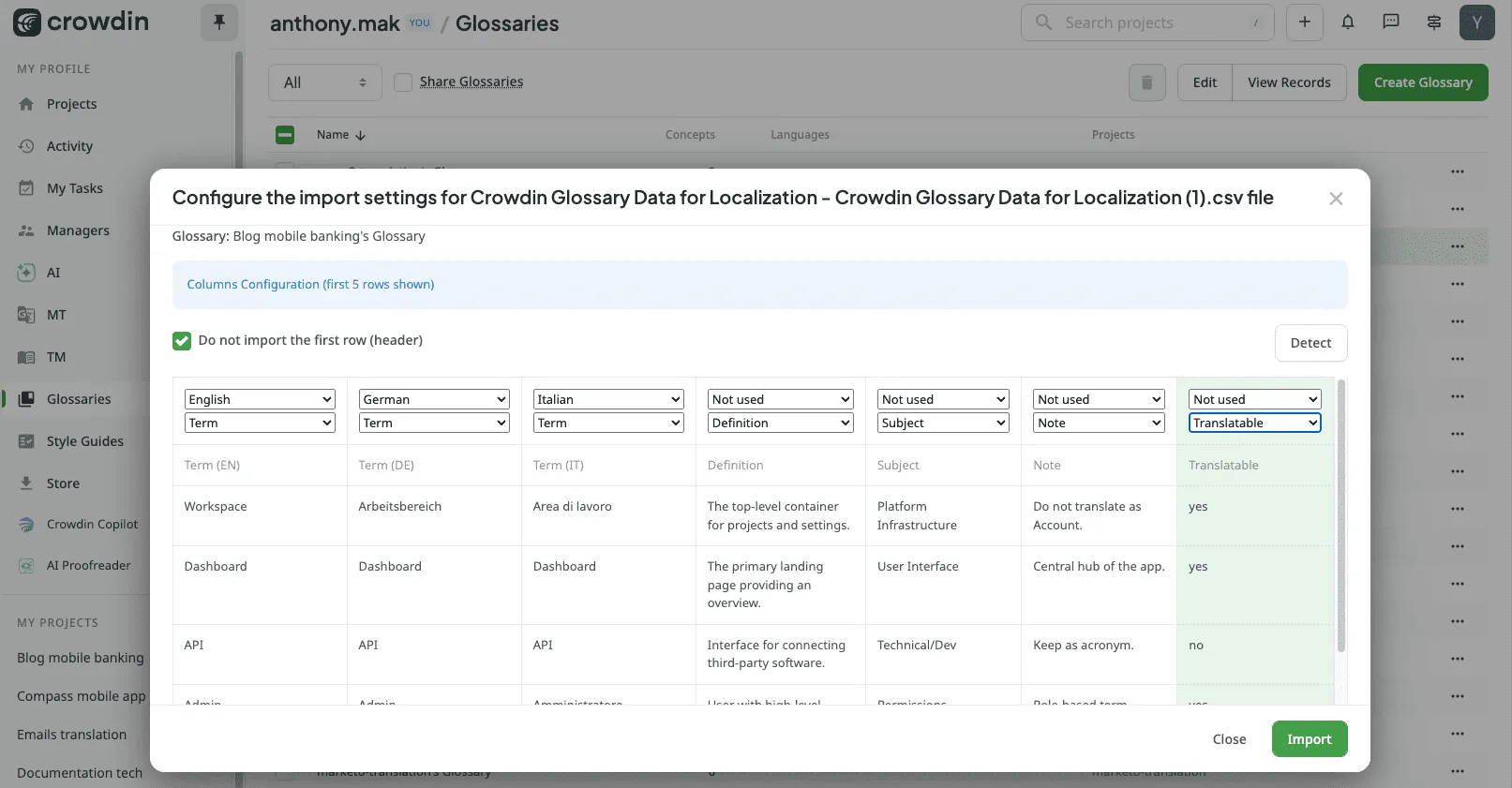
- Notes on the words you don’t want to be translated: Write down anything else you don’t want to be translated that isn’t already in your translation glossary. You can also use the “Translatable: No” toggle during import to ensure AI and humans alike leave these terms in the source language.
How to make a translation glossary step by step
Are you ready to start? This guide will help you make your first translation glossary from start to finish.
The first step is to decide which terms you want to include in your translation glossary.
Here are a few examples of what those terms might mean:
- Names of goods and services
- Words that are specific to a brand
- Acronyms
- Standard abbreviations
- Corporate slogans
- Text for buttons on a user interface
- Any words you want to keep in their original language
- Words that you use a lot in your writing
- Company-specific jargon
How do you figure out which glossary terms to include? Some of the words on the list above, like brand names and slogans, are easy to spot. Some of them might be harder to find in all your content. You can look at your product’s user interface (UI) or use a frequency calculator to find terms that are ready for a glossary.
Calculating frequencies
In this method, you just count how many times each word or phrase shows up in your content. Most of the time, you’ll want to include in your glossary the terms that come up most often.
It’s simple. With a little bit of programming, you can make a list of frequencies.
Con: You’ll have to filter out words like “the,” “I,” and “you” that are used often but don’t have anything to do with your product.
The user interface
With this method, you find the words that show up everywhere users interact with your website or app. It’s important that these terms are translated the same way every time because they help people use your product.
Pro: This approach might help you figure out how to improve the user experience as a whole.
Con: Since this process can’t really be automated, it can take a bit of time.
For projects that have already been translated into another language, you can use either segmented files or your translation memory to base your translation glossary on the translated material.
Use Simple Term Extractor to easily build a termbase
Your Crowdin project files can be used to build a termbase using Simple Term Extractor (STM). Instead of manual frequency calculation, this tool uses machine learning to identify high-impact terms and adds them directly to your Glossary, saving days of research.
Features:
- Works with Crowdin files.
- Adds Terms right to the selected Crowdin Glossary.
- Choose between the conventional statistical method and the machine-learning/AI-powered method. Comparing the two can help you decide which option is better for your project.
- It’s free.
How to use glossary in Crowdin
A glossary is a separate feature available on all plans that automatically highlights the terms and shows all the additional information provided with the term entry during translation in the Editor.
Creating a new glossary from scratch
Follow these steps to build a fresh glossary directly in the platform:
- Open Glossaries: In the left-hand navigation panel, click Glossaries.
- Initiate Creation: Click the Create Glossary button in the top-right corner.
- Basic Setup: In the dialog box, enter a Name and select a Default Language (this language will be displayed first in your records).
- Confirm: Click Create. Your new glossary is now ready to be filled with concepts! To add new concepts, double click on the glossary Name.
Importing an existing glossary
If you already have a terminology list, you can upload it in TBX, XLSX, or CSV format to populate your glossary in seconds. Simply open your glossary, click Import, and map your file columns to the corresponding concept fields like Definition, Subject, Translatable etc.
Manage multilingual concepts
Crowdin manages terminology at the concept level. A concept is a single “idea” that acts as the anchor for all your languages.
- One concept, many languages: under one concept (e.g., “Dashboard”), you can store the approved translation for every language in your project – German, Italian, Japanese, and more.
- Consistency across the board: when a concept is updated, the change is reflected across all languages. This ensures that if you change a definition in English, your Japanese translator and your AI model translating into French both see the updated context immediately.
- Term-level info: you can specify the part of speech and gender for each language individually, as grammar rules differ across the globe.
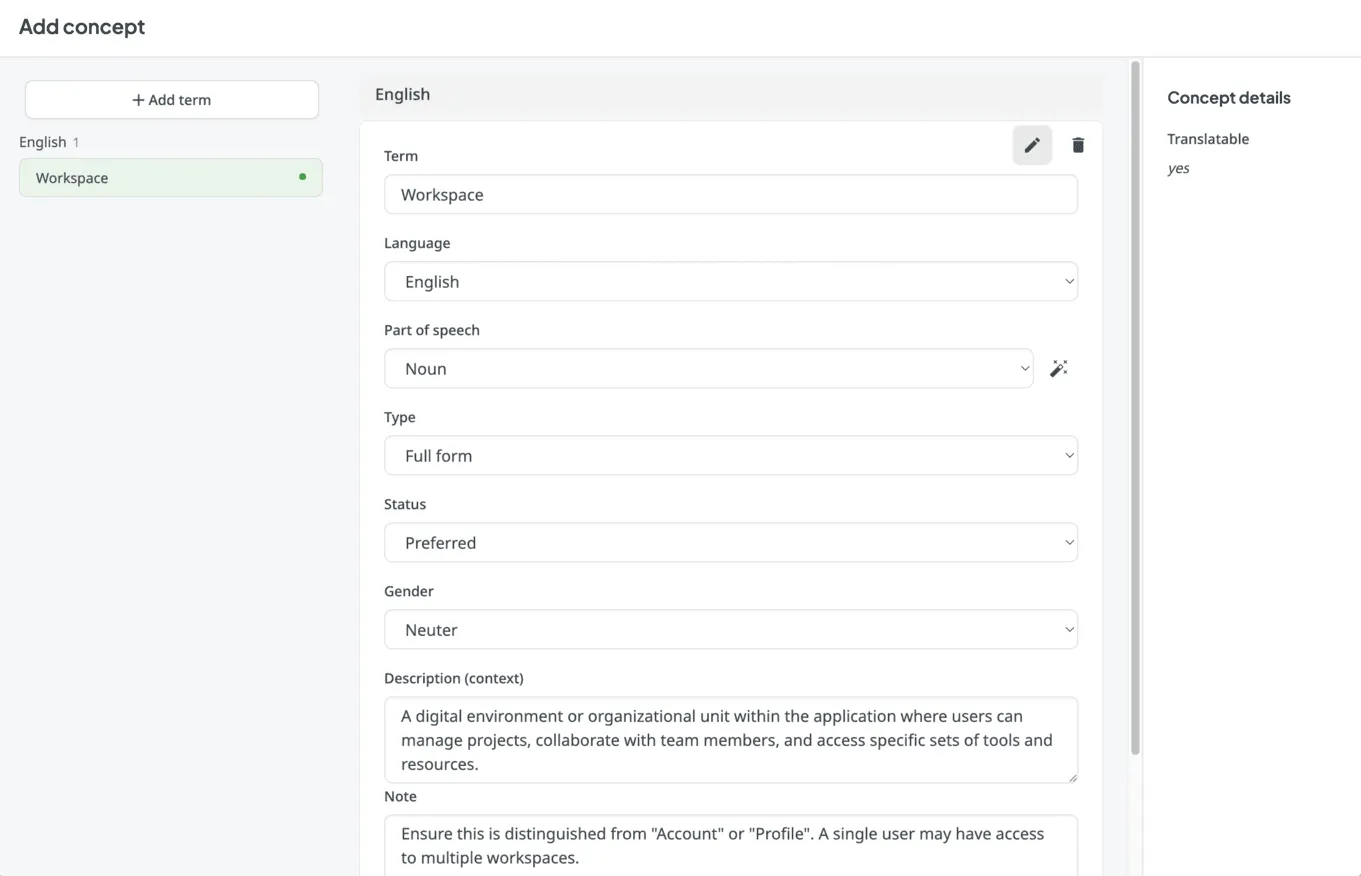
Each glossary entry can include the following information:
- term
- part of speech
- status
- gender
- description
- definition
- subject
- translation
- and more.
The logic is simple: the more context you provide for each term, the fewer mistakes you will encounter and the less time you will spend on manual post-editing.
Powering AI Prompts and QA Checks
In your project’s AI Settings, you can now integrate your glossary into your automated workflows:
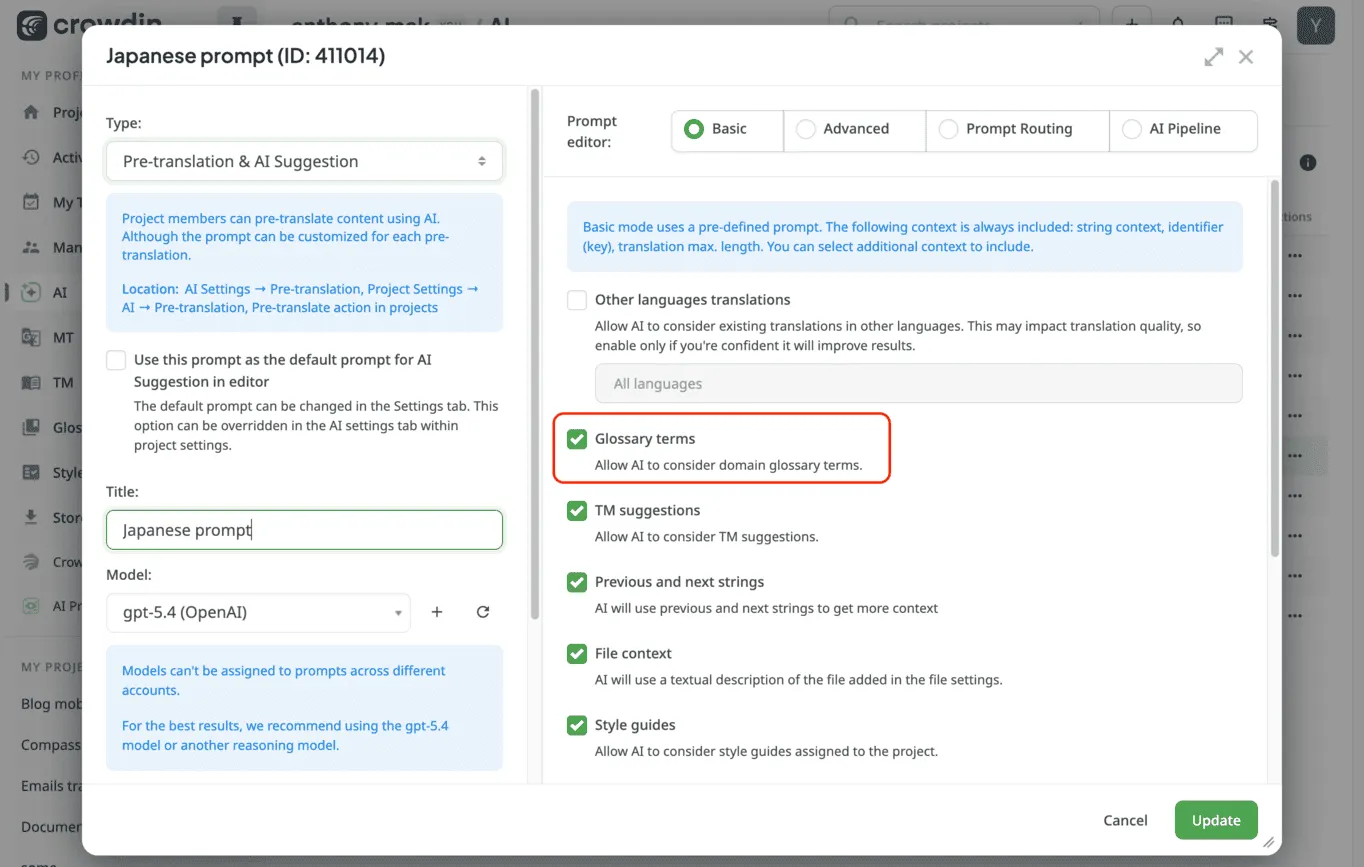
- AI Prompts: Enable the “Glossary terms” toggle in your prompt settings so that AI suggestions always prioritize your approved terminology.
- AI QA Checks: Configure an automated QA Check to flag any string where a glossary term was ignored or translated incorrectly.
Beyond terms, Crowdin can now use AI to generate a contextual summary of your entire file. This helps the AI understand where your glossary terms sit within the bigger picture of your content.
Share and update your translation glossary
A good translation glossary is, in the end, something that is always up-to-date. You can easily share Glossaries between projects to maintain a unified voice across your entire organization. Ask your translators or proofreaders to suggest new words via the Editor (Ctrl+G).
To keep your glossary clean without the manual headache, you can use Crowdin Copilot to handle bulk maintenance in seconds. Just ask Copilot to find and merge duplicate concepts, or have it flag generic “low-value” words that are cluttering your list. It can even rewrite your definitions in one go, ensuring they all share a consistent tone and technical level for your team and your AI.
Extend your workflow with glossary apps
- Smart Term Extractor (already mentioned): The best way to jumpstart your terminology list using AI-powered extraction.
- IATE Terminology Search: This app connects your project to the EU’s massive “Interactive Terminology for Europe” database. It’s an essential tool for projects in tech, law, or medicine, allowing you to find officially approved translations for specialized concepts in 25+ languages.
- Translate Glossary: A dedicated app that allows you to translate your glossary terms into all your target languages in one place.
- Merge TM & Glossary: A powerful utility for cleaning up your project data. It allows you to merge multiple translation memories or glossaries into one, helping you consolidate your “source of truth” and remove duplicates across different projects.
- DeepL Glossary Sync: If you use DeepL for machine translation, this app helps you sync your Crowdin terms with DeepL’s native glossary feature to ensure consistent translations when using their engine.
You can explore these and many others by searching for glossary in the Crowdin Store.
Conclusion
A localization glossary is an essential part of any localization project, especially in a hybrid world where humans and AI work side-by-side. It makes collaboration more accessible, ensures that translations are more accurate and consistent, and ultimately provides a better user experience for your global audience.
FAQ
1. What is a Localization Glossary?
A glossary is a list of words and phrases often used in the project, that includes their definitions and other details that would be helpful during translation (part of speech, translations, etc.) It can be based on a single project, brand voice, or an entire industry. A glossary, also called a termbase, is a beneficial resource and tool that can help any localization project stay consistent.
2. What Is Glossary Used For?
With a glossary, you can create, store, and keep track of all the terms for a project in one place. The main goal of terminology is to explain specific terms or terms used often in the project so that they can be translated correctly and consistently.
3. How do translators use Glossaries?
If you already have a glossary with terms in the source language it’s time to translate it. Translated glossaries include term translation and terms, that shouldn’t be translated. Using a glossary is especially helpful when multiple translators are working on your project. This way translators can use these terms and deliver consistent translations across languages.
For example, a company like Apple might not want to translate the words “iPhone” and “iTunes” no matter where they are making new content. So, this is something that should be added to their translation glossary.
A good example of using a translation glossary is GitLab - their glossary is translated into all their target languages and translators can discuss the best term translation variants. Once the term is approved – translators use it in all their translations. You can take a look at the GitLab translation glossary here.
4.How glossary terms are displayed in Crowdin?
In the Editor in Crowdin, each term in the glossary is shown as an underlined word. Move your mouse over the underlined words to see their translation, part of speech, and definition (if provided).

Khrystyna Humenna
Khrystyna Humenna is Head of Marketing, with over six years of experience in the localization industry. Her expertise is built on a deep understanding of various localization projects, informed by extensive customer interviews she has conducted.